


CallApp: Caller ID & Block
4.349.17K Reviews
App Specs
- Version
- Varies with Device
- Updated On
- License
- Free
- Downloads
- 100,000,000+
- Developer
- CallApp Caller ID, Call Recorder & Spam Blocker
- Categories
- Communication
- Platform
- Android, iOS
Screenshots

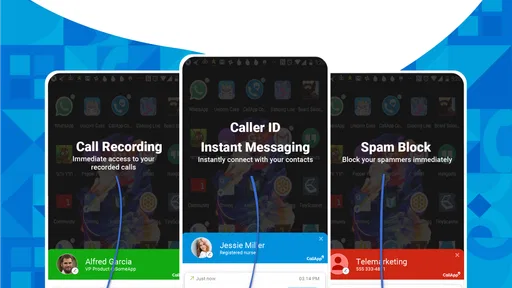
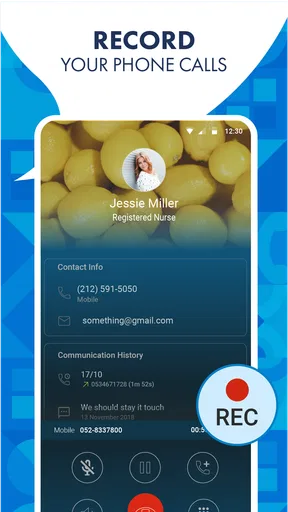
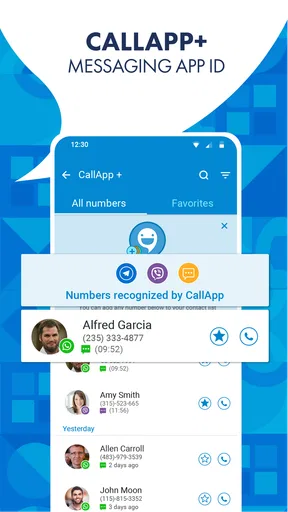
 Analysis by AppCompare
Ever had those moments when your phone rings, and you’re left wondering, "Who could this be?" Well, I’ve been there, and let me tell you, it’s not fun. That’s why I decided to give CallApp: Caller ID & Block a whirl. After using it for a while, I’m here to share my two cents on how this app can be a real game-changer in the world of phone calls.
Start with the problem you want to solve
Before installing a caller ID app, I’d ask myself what is actually interrupting my day: unknown callers, repeated nuisance calls, or the need to keep track of conversations. Those are related problems, but they do not always call for the same tool. A simple built-in blocking option may be enough if only one or two numbers bother you. A dedicated communication app makes more sense when recognizing unfamiliar callers and managing unwanted calls are regular chores.
CallApp is a free communication app developed by CallApp Caller ID, Call Recorder & Spam Blocker. It has been available since September 13, 2012, and its broad adoption—over 100 million installs—suggests that caller identification and spam handling are useful to many people. Its average rating is 4.3 from around 1.7 million ratings, with roughly 49,000 written reviews. It is rated for Everyone, works on Android 8.0 and later, and includes in-app purchases ranging from $0.99 to $149.99 per item, so I would check the current purchase options before choosing any paid extras.
Guides and Analysis on CallApp: Caller ID & Block
The practical question is not whether a caller ID app can show a label; it is whether that label helps me make a better decision at the moment the phone rings. I would treat an identification as a clue, not proof of who is calling. If I do not recognize the name or expect the call, I can let it go to voicemail and decide what to do after checking the context. That small habit is useful even with a caller ID service, because a displayed name should not be treated as a guarantee of identity.
What Exactly Is CallApp?
CallApp is designed to be your ultimate phone companion. It’s like having a personal assistant who knows everyone and can give you a heads-up before you pick up a call. The app primarily focuses on identifying unknown numbers, blocking spam calls, and offering a slick call recording feature. The idea is to make your calling experience as seamless as possible. So, if you're tired of getting interrupted by pesky telemarketers, this app might just be your new best friend.
Caller ID: Know Who’s Calling
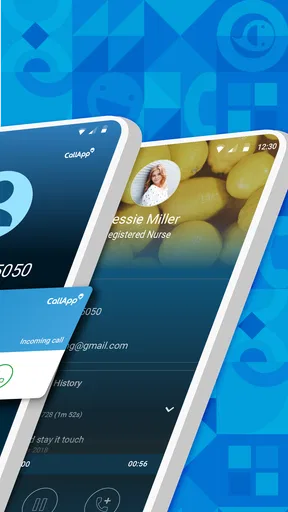
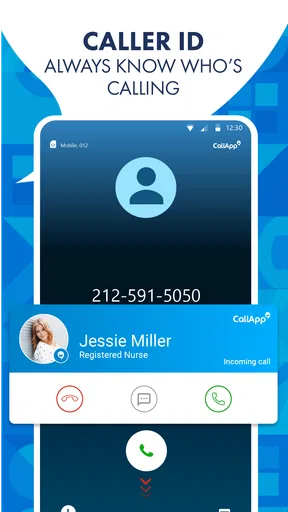
One of the standout features of CallApp is its Caller ID function. Whenever someone calls, the app instantly identifies the caller, even if they’re not in your contacts. It pulls information from a vast database and lets you know who’s on the other end before you answer. This means no more awkward moments trying to figure out who’s speaking!
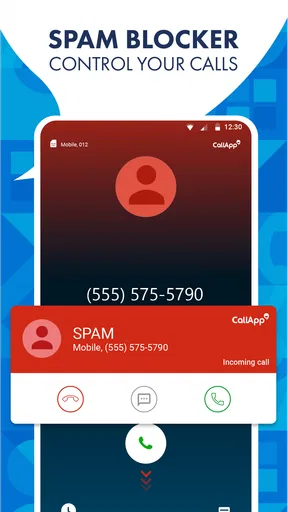
What’s cool is that it doesn’t just show the name; it can also display the caller’s photo and location. It’s like having a mini dossier on every caller. And, if the caller is a spammer, the app will give you a heads-up, so you can decline and go about your day without a hitch.
Worth Reading Before You Choose

Ludo King Makes the Most of the Minutes Between Plans

Baby Panda World Brings Quick Play to Modern Phones, but Its Game Library Feels Busy

ESPN’s Live Game View Makes Following Close Games Easier

QuizzLand Review: A Good Fit for Short Trivia Breaks, Not Every Player

Basketball Stars: Multiplayer Is Fast, but Can It Recover When Matches Go Wrong?

WEBTOON Turns Phone Updates Into a Better Reading Routine
When Caller ID is useful—and when to be cautious
I find caller identification most useful when I’m waiting on a call from someone who is not yet in my contacts, such as a service provider or a business I have just contacted. It can help me decide whether to answer without interrupting whatever I am doing. But a label, photo, or location should not replace common sense: I would still avoid sharing personal details or payment information just because a call appears familiar.
For a less obvious workflow, I would use the caller ID as a first filter rather than a final verdict. If a call looks relevant but arrives at a bad time, I can decline it and call back through a number I already trust. If it looks suspicious, I can leave it unanswered and see whether the caller leaves a message. That approach gets value from identification without letting an uncertain match pressure me into answering.
Blocking Unwanted Calls
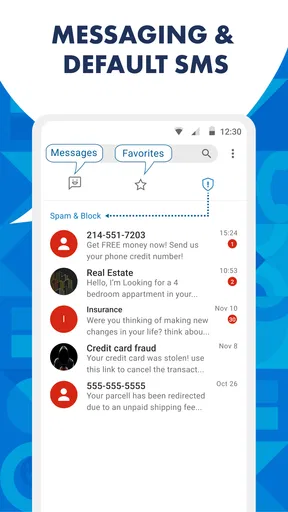
Let’s face it, we’ve all been hounded by unsolicited calls at some point. With CallApp, you can easily block those annoying spammers. The app maintains a frequently updated database of known spam numbers. If any of these numbers try to reach out, they’re blocked automatically. Plus, you can add numbers to your personal block list, so you’re always in control of who can and can’t reach you.
Build a block list with a little care
Automatic filtering is convenient, but I would not assume that every unwanted call will be identified or that every unfamiliar number is harmful. A legitimate caller may be using a number I have never seen, while nuisance callers can change numbers. If I block a number myself, I would first check that it is not connected to a delivery, appointment, workplace, or other contact I still need. Reviewing personal blocks now and then can prevent a quick decision from turning into a missed call later.
That is also where a dedicated blocker differs from using only the phone’s basic reject option. The built-in option is straightforward for a known repeat caller; an app that combines identification with spam handling can be more convenient when the numbers change and the calls are frequent. The trade-off is that a broader tool asks me to rely on its judgments more often, so I would keep the ability to manage my own list and pay attention to calls that matter.
Recording Calls: A Handy Feature
Need to keep a record of important conversations? CallApp’s call recording feature is here to save the day. Whether it’s a business call or a chat with a loved one, you can record it with just a tap. The recordings are saved in high quality, and you can access them anytime you need. Just remember to inform the other party that the call is being recorded; it’s a good practice to maintain transparency.
Use recordings deliberately
A recording can be helpful when I need to revisit instructions, names, or details from a call instead of relying on memory. For example, after a complicated service conversation, having a record may make it easier to check what was discussed. I would still decide before the call whether recording is appropriate, tell the other person, and keep only recordings I have a reason to retain. The feature is less useful for someone who rarely needs a record and does not want another type of content to manage.
Call recording also does not replace written confirmation. For an appointment, payment arrangement, or work decision, I would still ask for important details in a message or email when possible. A recording can be a personal reference, but it is not a good reason to skip clear follow-up or to record sensitive conversations casually.
A User-Friendly Experience
What I appreciate about CallApp is its intuitive design. The interface is clean and easy to navigate. Setting up the app is a breeze; you don’t need to be a tech wizard to get it running. Once installed, it integrates seamlessly with your existing dialer, so you don’t have to juggle between different apps.
Customizability is another plus. You can tweak the app settings to suit your preferences, from setting a custom theme to choosing how the Caller ID information is displayed. It’s all about making the app work for you, not the other way around.
Make the setup fit your habits
During setup, I would take a moment to decide which parts of the experience I actually want to use. Someone who mainly wants fewer interruptions can focus on caller identification and blocking, while someone who needs occasional call records can explore recording separately. Keeping the setup focused makes it easier to tell whether the app is helping, rather than switching on every option and then wondering which one changed the way calls are handled.
It is also worth thinking about how you use your phone day to day. If you share a device, regularly lend it to family, or rely on a particular dialer workflow, test the normal tasks you care about after setup: receiving a call, returning a missed call, and checking a saved number. An app can feel simple in its own screens but still be a poor fit if it interrupts a routine you already like.
How it compares with simpler alternatives
The usual alternatives fall into two camps: the phone’s built-in caller and blocking tools, and a separate service focused on identifying unfamiliar numbers. Built-in tools are often the cleaner choice if I only need to silence a few known callers and prefer not to add another app to my routine. CallApp’s appeal is that caller identification, spam blocking, and recording sit together, which can save steps for someone who wants all three kinds of help.
A more specialized alternative may suit someone who wants only one function, such as basic call screening, and values keeping the rest of the phone experience unchanged. I would not switch merely because an app has a longer feature list. I would switch if unknown calls are a recurring nuisance or if I genuinely need its combination of tools. On the other hand, if I rarely receive unwanted calls, use voicemail comfortably, and never record conversations, the extra capability may add little to my day.
What to consider before making it your default
Installing a call-management app changes how I handle a basic part of my phone, so I would try it during an ordinary week rather than judging it after one call. Notice whether the labels are useful, whether the blocking behavior matches your expectations, and whether the interface makes it easy to return missed calls. If the results create more checking than they save, that is a fair reason to go back to the phone’s standard tools.
It is sensible to review the app’s current settings and permissions on your own device and consider what information you are comfortable sharing with any communication app. I would also check the in-app purchase screen before paying for anything, since the app is free to start but offers purchases. That way, I can decide based on the features I actually use rather than assuming every option is included at no cost.
Final Thoughts
Overall, CallApp: Caller ID & Block delivers on its promises. It’s reliable, efficient, and offers a suite of features that make handling calls a breeze. Whether you’re looking to avoid spam calls or keep a record of your conversations, this app has got you covered. It’s one of those apps that, once you start using, you’ll wonder how you ever managed without it.
So, if you’re tired of the endless barrage of unknown calls and want to take back control of your phone, give CallApp a try. It’s available for both Android and iOS, so download it today and enjoy a more streamlined calling experience.
Who I would recommend it to
I would recommend it most to people who regularly receive calls from numbers they do not know, want a single place to handle identification and blocking, or sometimes need a record of a conversation. A realistic example is someone arranging home repairs: a call from an unfamiliar number may be the technician, while repeated unwanted calls are competing for attention. Caller ID can help sort those calls at a glance, and a personal block list can help deal with numbers that keep returning.
I would be more cautious about recommending it to someone who prefers the simplest possible phone setup, rarely answers unknown numbers, or has no use for call recording. In those cases, the phone’s built-in controls and voicemail may be enough. My clear advice is to try CallApp if incoming calls are a real daily nuisance, then keep it only if its identification and blocking make your routine calmer without adding more settings to manage.
Pros
- Efficient call blocking with customizable settings.
- Accurate caller ID for unknown numbers.
- Comprehensive contact management features.
- User-friendly interface with easy navigation.
- Syncs seamlessly with social media contacts.
Cons
- Contains ads that may interrupt usage.
- Premium features require a subscription.
- Occasional lag in identifying callers.
- Limited support for older device models.
- Requires access to personal data for full functionality.
FAQs for CallApp: Caller ID & Block
What features does CallApp: Caller ID & Block offer?
CallApp provides a robust caller ID feature that identifies unknown callers and blocks spam calls. It also includes call recording, contact management, and a smart dialer. Users can customize their experience with themes and ringtones, making it a comprehensive tool for managing phone interactions.
Is CallApp: Caller ID & Block free to use?
CallApp offers a free version with essential features such as caller ID and spam blocking. However, there is a premium version available through in-app purchases that unlocks additional features, such as ad-free usage and advanced call recording options, providing a more enhanced user experience.
How does CallApp ensure user privacy and data security?
CallApp prioritizes user privacy by using encryption to protect data. It requires certain permissions to function but ensures that data is not shared with third parties without consent. Users should review the privacy policy for detailed information on how their data is handled and protected.
Can CallApp block all spam calls effectively?
CallApp utilizes a community-driven database to identify and block spam calls. While it is effective in blocking many spam calls, no app can guarantee 100% blocking accuracy. Users can manually block numbers and report spam calls to enhance the app’s efficiency in identifying unwanted calls.
Is CallApp compatible with all Android and iOS devices?
CallApp is compatible with most Android devices running version 4.1 and higher. Unfortunately, due to certain restrictions, the app's functionality is limited on iOS devices. Users should check the app store for compatibility with their specific device before downloading.


